

It’s common to use Google to look up well-known people. Typically, the search results show a brief overview of the person’s interests, social media profiles, and public records. The “Add Me to Search” option on Google has made this possible. This function makes advertising your business or personal profile simple in search results. We’ll review every aspect of using the Add Me to Google tool to create a virtual Google Search Card in this blog.
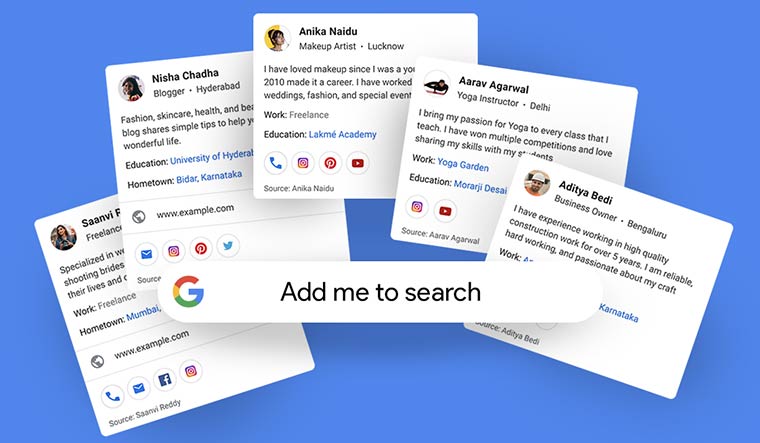
What is Add Me To Search?
Google Search has a feature called “Add Me To Search” that allows people to generate a personal profile visible to anyone who searches for their name. The profile contains the individual’s name, profile photo, job title, location, and links to their website, blog, or other online profiles. To use this feature, one must have an active Google account, which can be a Gmail address or a G Suite account.
Requirements for Creating a Google People Card
To be eligible for the Google People Card, your profile must contain your complete name, a recent profile picture, job title, location, links to your online presence, and a summary of your skills and qualifications. This feature is intended to facilitate connections between people by providing easy access to pertinent information about individuals. You are responsible for managing and keeping your Google People Card updated to ensure the information displayed is precise and current.
Benefits of Add Me to Search
Adding yourself to Google Search through the Google People Card can have several benefits:
- Increased Visibility: Helps increase your online visibility, making it easier for people to find you when they search for your name.
- Professional Presence: Highlights your skills, qualifications, and experience, giving you a more credible online presence.
- Connecting With Others: Makes it easier for people to connect with you and find out more about you.
- Better Search Results: Improves the quality of search results related to your name, ensuring users find relevant information about you.
- Control Over Your Online Identity: Allows you to control the information that appears in search results when someone searches for your name.
- Impressive Professional Profile: Looks fantastic across desktop, laptop, tablet, and mobile platforms, and is easy to customize.
- Increased Presence: Boosts engagement by encouraging users to browse your profile.
- Visibility to Employers: Makes it easier for employers to find your profile, simplifying the hiring process.
- Enhanced Professional Networking: Helps grow your professional network quickly and effortlessly.
- Earn Google Certification: Allows you to obtain Google Certifications in your field, promoting your abilities and giving you a competitive advantage.
Things To Know Before Creating Your Own People Card
Before generating your Google People Card, remember that only people in certain countries with Google accounts are eligible. You must provide your full name, profile photo, work title, address, and links to your online profiles. Privacy issues should also be considered because the information given will be accessible to anybody performing a name search. It is your job to maintain and update your People Card to reflect you and your abilities appropriately.
How To Create Add Me To Google Search Card
Step 1: Search “Add Me To Search” or “Add Me To Google”
Ensure your language is set to English and Hindi. Enter the search query “add me to search” or “add me to Google,” and you should see the first option to create your people card. Click on Get Started.
Step 2: Enter The Correct Information
Fill in your information. The first fields are name, location, about, and job. You can also add the following social profiles to your Google card: YouTube, Facebook, Twitter, Instagram, LinkedIn, Pinterest, SoundCloud. Most information can be entered manually. However, Google automatically fetches email and phone numbers from your account.
Step 3: Preview And Submit The Card
Preview the card before it goes live. Click Preview at the bottom of the page. If you’re satisfied, save it and click Submit. Search engines should index it.
Requirements for Google People Card
To create a Google People Card, you need:
- An active Google account (Gmail or G Suite)
- Full name and a brief bio
- Profile image
- Work title
- Location
- Links to your website, blog, or social media profiles
- A concise summary of your skills and qualifications
What to Do When the Google People Card is Not Working
If your Google People card is not working properly:
- Check if your Google account is in good standing.
- Ensure your Google People card is complete and contains all relevant information.
- Wait a few hours or a day and try searching for your name again.
- Log out of your Google account and search for your name while logged out.
- Contact Google support if issues persist.
How To Edit The Google People Card
To edit your Google People Card:
- Open the internet browser on your mobile device and log in with your Google account.
- Search for “edit my people card.”
- Click on Edit at the top right corner.
- Change the sections you wish to edit and save the changes.
How to Remove Email And Phone Numbers from Google People Card
To remove email and phone numbers from your Google People Card:
- Search for your name on Google.
- Click on the “Edit” button at the bottom of your People Card.
- Delete the information you want to remove and click “Save.”
- Review the rest of your People Card to ensure all information is accurate and up-to-date.
- Click “Publish” to save your updated People Card.
How to Delete Google People Card
To delete your Google People Card:
- Visit Google.com or open the Google Search app.
- Sign in to your Google Account.
- Search for “edit my people card.”
- Click “Remove my search card from Google.”
Deleting your Google People card will remove it from search results and make it inaccessible to others.
How To Make Your Google People Card More Effective
To make your Google People Card more effective:
- Include all relevant information, such as your email, phone number, website, and social media links.
- Keep your card up-to-date with accurate information.
- Establish and maintain connections with others.
Conclusion
Adding yourself to Google Search through the Google People Card can help you establish a professional online presence, connect with others, and control your online identity. By creating a Google People Card and including information such as your name, profile picture, job title, location, links to your online profiles, and a summary of your skills and qualifications, you can increase your visibility and make it easier for people to find you.
Frequently Asked Questions (FAQs)
What Is Add Me To Search?
Google People Cards, also known as “Add Me to Search,” is a feature that lets you create a public profile on Google search. This profile displays your name, occupation, contact details, and links to your social media profiles.
What Is The Use Of Google People Card?
The Google People Card is useful for increasing visibility on Google searches. It allows you to provide relevant information about yourself that can be easily searchable.
How Do I Create A Google People Card?
Follow the instructions in this article. When someone searches for you, your profile picture, shared information, and other details will appear alongside their search results.
How Do I Edit My Google People Card?
Open the Google Search app or Google.com, ensure you are logged in to your Google Account, search for “Edit my People Card”, and tap “Edit” at the top right corner. Make necessary changes, preview, and save.
How Do I Delete My Google People Card?
Visit the Google People Card website, sign in to your Google account, locate the “Delete” button, and confirm deletion to remove your People Card from Google search results.
Conclusion
The Google People Card allows individuals to appear in search results by creating profiles that include relevant personal information and social media links. It helps in branding and acquiring targeted leads. Follow the virtual search card guidelines and optimize the card for better results. The search card can be easily added, removed, or edited. Add Me to Google Search allows individuals to separate themselves on search engines, making it an innovative way of personal branding.

Mohammed Salman is an SEO Expert and Digital Marketing Specialist based in Palakkad, Kerala, India, with 5+ years of experience and 40+ projects delivered for clients in India, UAE, UK, USA, and across Southeast Asia. He holds an MBA in Marketing and Human Resources and is trained by Kreative Academy. He specialises in SEO strategy, GEO optimisation, technical SEO, local SEO, content marketing, and paid advertising.

July 26, 2024